I used to trust fast unit tests as a signal of stability until browser-specific bugs kept slipping through. Logic that looked correct in isolation behaved differently once real rendering, events, and timing entered the picture.
That disconnect pushed a closer look at whether Playwright could support unit testing without turning everything into slow end-to-end tests.
Overview
Benefits of Using Playwright for Unit Testing
- Runs unit tests in real browsers instead of simulated environments
- Validates browser APIs and rendering behavior accurately
- Tests UI logic and interactions with real event handling
- Catches browser-specific issues earlier in the test cycle
- Supports deterministic tests through built-in network mocking
- Reduces gaps between local, CI, and production behavior
- Produces failures that reflect real user-impacting issues
This article breaks down how Playwright can be used for unit testing, where it adds meaningful value, and where traditional unit tests still do the job better.
What Is Unit Testing in Modern Frontend Applications?
Unit testing in modern frontend applications validates the smallest meaningful pieces of code in isolation. These units are no longer limited to pure functions. They often include component logic, conditional rendering paths, state transitions, and browser-driven behavior.
Modern frontend stacks introduce complexity through asynchronous rendering, framework abstractions, and reliance on browser APIs such as localStorage, ResizeObserver, or media queries.
Simulated DOM environments execute quickly but fail to capture how code behaves inside real browsers. As a result, unit tests may pass while production behavior breaks. Modern unit testing increasingly focuses on correctness under realistic execution rather than speed alone.
Can Playwright Be Used for Unit Testing?
Playwright can be used for unit testing when the browser is part of the unit being validated. It runs code inside real browser contexts, making it suitable for testing logic that depends on rendering engines, event propagation, or layout calculations.
Playwright-based unit tests typically focus on isolated UI components rendered on minimal pages, browser-dependent utilities, and edge cases driven by timing or interaction. It should not replace traditional unit testing frameworks but complement them where browser realism matters.
Read More: How to Scroll to Element in Playwright
Playwright vs Traditional Unit Testing Frameworks
Playwright and traditional unit testing frameworks serve different purposes. The distinction becomes clearer when comparing execution models and failure signals.
| Aspect | Traditional Unit Frameworks | Playwright |
| Execution environment | Simulated DOM or Node runtime | Real browsers |
| Speed | Very fast | Slower due to browser startup |
| Best for | Pure logic and data transformations | Browser-dependent behavior |
| Failure insight | Logical correctness | Rendering, timing, and interaction issues |
| Isolation | High | Requires discipline |
Traditional tools remain ideal for pure logic. Playwright excels when browser behavior influences outcomes.
When Playwright Makes Sense for Unit-Level Tests
Playwright fits unit-level testing when browser behavior directly affects the outcome of the logic being tested. In these cases, simulated environments often hide real-world failures.
Playwright is effective for unit-level tests when:
- Logic depends on layout calculations such as element size, visibility, or overflow
- Behavior changes based on viewport size or media queries
- Units rely on browser APIs like IntersectionObserver, storage, or clipboard access
- Interaction logic depends on real event timing, focus handling, or keyboard navigation
- Edge cases emerge only during real rendering or asynchronous browser execution
Playwright should be used selectively at this level, focusing on units where browser execution is part of the logic itself, while pure computation remains in traditional unit tests.
Setting Up Playwright for Unit Testing
Setting up Playwright for unit testing requires a configuration that prioritizes speed, isolation, and browser realism without drifting into end-to-end complexity. The goal is to keep feedback fast while still validating behavior in a real browser.
Read More:How to install Playwright
Before configuring anything, it is important to treat Playwright unit tests as a distinct layer. They should not share the same setup as long-running integration or end-to-end suites.
Key setup considerations include the following.
- Keep the browser scope minimal by starting with a single browser project instead of multiple targets. This reduces startup time and keeps failures easier to diagnose.
- Run tests in headless mode to improve execution speed while preserving browser behavior.
- Disable video recording, tracing, and screenshots unless debugging is required, as these features add overhead.
- Use strict timeouts to surface performance regressions and prevent hidden flakiness.
A lightweight configuration ensures Playwright unit tests execute in seconds rather than minutes. Once this foundation is stable, additional browsers or diagnostics can be layered in only where browser-specific coverage is required.
Structuring Unit Tests in a Playwright Project
A clear structure keeps Playwright unit tests focused and prevents them from slowly turning into integration or end-to-end tests. The main goal is separation: unit-level Playwright tests should validate isolated behavior with minimal app dependencies.
Before outlining the structure, it helps to define a simple rule: if a test needs authentication, multiple pages, or real backend data, it is not a unit-level Playwright test.
- Create a dedicated folder for unit-level Playwright tests, separate from UI flows or end-to-end suites.
- Group tests by component or logic domain, not by user journey. This keeps scope tight and improves maintainability.
- Use minimal HTML fixtures or lightweight test pages to render a single component or feature in isolation.
- Keep shared setup small. Prefer local helpers per domain rather than a heavy global setup that introduces hidden dependencies.
- Maintain a clear naming convention so unit-level Playwright tests are easy to filter in CI and local runs.
- Ensure each test file targets a narrow surface area. If a file grows into a full workflow, it should be moved to an integration layer.
This structure makes it easier to scale Playwright unit tests without losing the speed and clarity expected from unit testing.
Mocking Network Requests and Dependencies in Playwright
Mocking network requests is essential when using Playwright for unit testing because real backend dependencies quickly turn small tests into slow, flaky checks. The objective at the unit level is to isolate UI logic while still executing inside a real browser.
Before applying mocks, it helps to identify which dependencies introduce variability. In most unit-level Playwright tests, network calls exist only to drive UI state, not to validate backend correctness.
The following practices help keep network mocking effective and scoped.
- Mock APIs that provide state, configuration, or feature flags required for rendering
- Replace data-heavy or unstable endpoints with static responses
- Simulate error responses to validate fallback and retry behavior
- Block third-party requests that add noise but no unit-level value
Playwright supports request interception through routing, which allows tests to respond with controlled data while keeping browser execution intact.
A common unit-level pattern is intercepting an API and returning a minimal payload that drives the UI.
await page.route('**/api/user', route =>

  route.fulfill({

    status: 200,

    contentType: 'application/json',

    body: JSON.stringify({ name: 'Asha', role: 'Admin' })

  })

);
This approach removes backend dependency while keeping assertions focused on UI behavior.
Error handling can be validated using the same mechanism by returning failure responses.
await page.route('**/api/orders', route =>

  route.fulfill({ status: 500 })

);
Beyond HTTP calls, unit-level Playwright tests often need to control other dependencies. Common examples include pre-seeding localStorage or sessionStorage, injecting feature flags, or controlling time-sensitive logic through initialization scripts.
A simple pattern for storage-based dependencies is injecting state before the page loads.
await page.addInitScript(() => {

  localStorage.setItem('onboardingComplete', 'true');

});
Effective network and dependency mocking keeps Playwright unit tests deterministic without stripping away browser realism. The key is to mock only what the unit depends on and leave the rest of the browser behavior untouched.
Testing UI Logic and Component Behavior with Playwright
Testing UI logic and component behavior fits naturally into a Playwright-based unit testing strategy when the scope stays narrow and focused. Many frontend units today combine state, rendering rules, and user interaction, making browser execution part of the logic itself.
At the unit level, the goal is not to validate full user journeys but to confirm how a single component reacts to specific inputs, state changes, or events.
Common unit-level UI behaviors suited for Playwright include:
- Enabling or disabling controls based on form input or validation state
- Conditional rendering triggered by feature flags or configuration values
- Keyboard navigation order and focus management within a component
- UI state transitions caused by clicks, hovers, or key presses
- Accessibility attributes applied dynamically during interaction
Playwright’s real browser execution ensures these behaviors are validated using actual event propagation and rendering timing rather than simulated approximations.
A typical unit-level pattern is rendering a single component on a minimal test page and interacting with it directly.
test('submit button enables when input is valid', async ({ page }) => {

  await page.goto('/test-pages/form.html');

  const input = page.getByRole('textbox');

  const submit = page.getByRole('button', { name: 'Submit' });

  await expect(submit).toBeDisabled();

  await input.fill('valid value');

  await expect(submit).toBeEnabled();

});
This test validates component behavior without relying on routing, authentication, or backend services.
Keyboard and focus behavior is another area where Playwright adds unit-level value.
test('focus moves to next field on Tab', async ({ page }) => {

  await page.goto('/test-pages/form.html');

  await page.getByRole('textbox', { name: 'First name' }).focus();

  await page.keyboard.press('Tab');

  await expect(

    page.getByRole('textbox', { name: 'Last name' })

  ).toBeFocused();

});
These checks are difficult to validate reliably in mocked environments but are critical for real user interaction.
To keep tests unit-focused, assertions should remain behavioral rather than visual. Layout appearance, screenshots, and cross-page flows introduce noise and belong to higher testing layers.
When applied this way, Playwright becomes a precise tool for validating UI logic and component behavior that traditional unit tests cannot reliably cover.
Handling Assertions and Test Isolation in Unit Tests
Assertions and isolation determine whether Playwright unit tests remain reliable or slowly become flaky and misleading. Because Playwright executes in a real browser, poorly scoped assertions or shared state can easily produce false positives and non-deterministic failures.
At the unit level, assertions should validate one behavior at a time. Each test must answer a single question about how a unit behaves under a specific condition. When multiple behaviors are asserted together, failures become harder to diagnose and tests lose their diagnostic value.
Effective assertion practices include:
- Asserting outcomes, not implementation details
- Verifying UI state changes rather than intermediate DOM structure
- Avoiding chained or unrelated expectations in the same test
- Using explicit assertions instead of relying on implicit timing behavior
A focused assertion example:
test('error message appears on invalid input', async ({ page }) => {

  await page.goto('/test-pages/form.html');

  await page.getByRole('button', { name: 'Submit' }).click();

  await expect(page.getByText('Invalid input')).toBeVisible();

});
This test validates one outcome and fails clearly when behavior changes.
Test isolation is equally critical. Each unit test should run as if no other test exists. Shared browser state introduces hidden dependencies that surface as flaky failures over time.
Key isolation techniques include:
- Creating a new browser context for each test
- Avoiding shared storage, cookies, or session state
- Resetting mocked routes and test data between tests
- Preventing reliance on execution order
Playwright’s default test runner supports isolation through fresh contexts, but custom setup can override this safety if not handled carefully.
Isolation also applies to timing. Tests should never depend on fixed delays. Instead, they should wait for observable conditions such as element visibility or state changes. This keeps unit tests resilient across environments and execution speeds.
Handled correctly, precise assertions and strict isolation ensure Playwright unit tests remain fast, deterministic, and valuable as part of a broader unit testing strategy.
Running these isolated Playwright unit tests on real browsers using BrowserStack Automate ensures assertions behave consistently across environments, not just locally
Benefits of Using Playwright for Unit Testing
Using Playwright for unit testing offers clear advantages when browser behavior is part of the logic being validated. It strengthens confidence in UI-related units without replacing traditional unit test frameworks.
Key benefits include:
- Real browser execution: Unit tests run inside actual browser engines, exposing issues related to rendering, event handling, and timing that simulated DOMs often miss.
- Accurate validation of browser APIs: Logic relying on APIs such as storage, observers, clipboard access, or media queries behaves exactly as it would in production.
- Better coverage of UI logic:State transitions, conditional rendering, focus management, and keyboard interactions can be validated reliably at a unit level.
- Reduced gap between unit and integration tests: Browser-realistic unit tests catch issues earlier, lowering the risk of failures surfacing only during end-to-end testing.
- Deterministic tests with controlled mocking: Built-in network interception allows isolation of dependencies while keeping UI behavior realistic and predictable.
- Improved confidence across environments: Unit tests validate behavior under real execution conditions, reducing false positives caused by mocked or headless-only setups.
- Stronger failure signals: Failures typically indicate real user-impacting issues rather than limitations of the test environment.
When applied selectively, Playwright enhances unit testing by validating the parts of the system where browser behavior directly influences correctness.
Limitations of Using Playwright for Pure Unit Testing
Playwright is powerful for validating browser-dependent behavior, but it is not designed to replace traditional unit testing frameworks. Using it for pure unit testing introduces trade-offs that reduce efficiency without adding meaningful confidence.
The primary limitation is that Playwright requires a real browser context. This makes it inherently heavier than in-memory test runners and unsuitable for logic that does not depend on browser execution.
Key limitations include:
- Slower execution due to browser startup and teardown compared to traditional unit tests
- Higher resource usage, especially when scaling large numbers of tests
- Limited value for testing pure functions, algorithms, or data transformations
- Increased maintenance overhead when browser configuration changes
- Risk of over-scoping tests into integration or end-to-end territory
For these reasons, Playwright works best as a complement to unit testing frameworks rather than a replacement. Pure logic and business rules should remain in traditional unit tests, while Playwright targets units where browser behavior directly impacts correctness.
Common Mistakes When Using Playwright for Unit Testing
Playwright is often misused in unit testing because it looks similar to end-to-end tooling. Without clear boundaries, unit-level tests quickly become slow, brittle, and hard to maintain.
One common mistake is treating Playwright as a replacement for traditional unit testing frameworks. Playwright excels at browser-dependent behavior, not pure logic. Using it to test simple functions or data transformations adds unnecessary overhead without improving confidence.
Another frequent issue is writing long user flows and labeling them as unit tests. Multi-step navigation, authentication, and cross-page interactions belong to integration or end-to-end testing. Unit-level Playwright tests should focus on a single component or behavior.
Additional mistakes include:
- Sharing browser state across tests, leading to hidden dependencies and flaky failures
- Relying on fixed delays instead of waiting for observable conditions
- Over-mocking or mocking unrealistic responses that never occur in production
- Asserting too many behaviors in a single test, making failures harder to diagnose
- Ignoring test isolation for the sake of faster execution
Avoiding these mistakes keeps Playwright unit tests fast, deterministic, and aligned with their intended purpose within the overall testing strategy.
Best Practices for Playwright-Based Unit Tests
Playwright-based unit tests stay valuable only when they remain small, deterministic, and clearly scoped. The best practices below help keep this layer fast while still benefiting from real browser execution.
Before applying these practices, it helps to treat Playwright unit tests as a separate tier: they should target browser-dependent units, not replace traditional unit tests for pure logic.
- Keep scope tight by testing one component behavior or logic path per test
- Prefer minimal test pages or fixtures instead of loading the full application
- Mock network dependencies so tests validate UI logic, not backend stability
- Use fresh browser contexts and avoid shared cookies, storage, or session state
- Avoid fixed sleeps and rely on condition-based waits such as visibility or state checks
- Write assertions against user-visible outcomes rather than internal DOM structure
- Use stable selectors like data-testid to reduce failures caused by UI refactors
- Separate Playwright unit tests from end-to-end suites so CI can run them quickly
- Fail fast with strict timeouts and keep retries low to avoid masking real issues
- Review tests for scope creep during code review, especially when navigation or multiple pages appear
Following these practices keeps Playwright unit tests predictable and maintainable while capturing real browser behavior that traditional unit tests often miss.
Why Choose BrowserStack to Run Playwright Unit Tests?
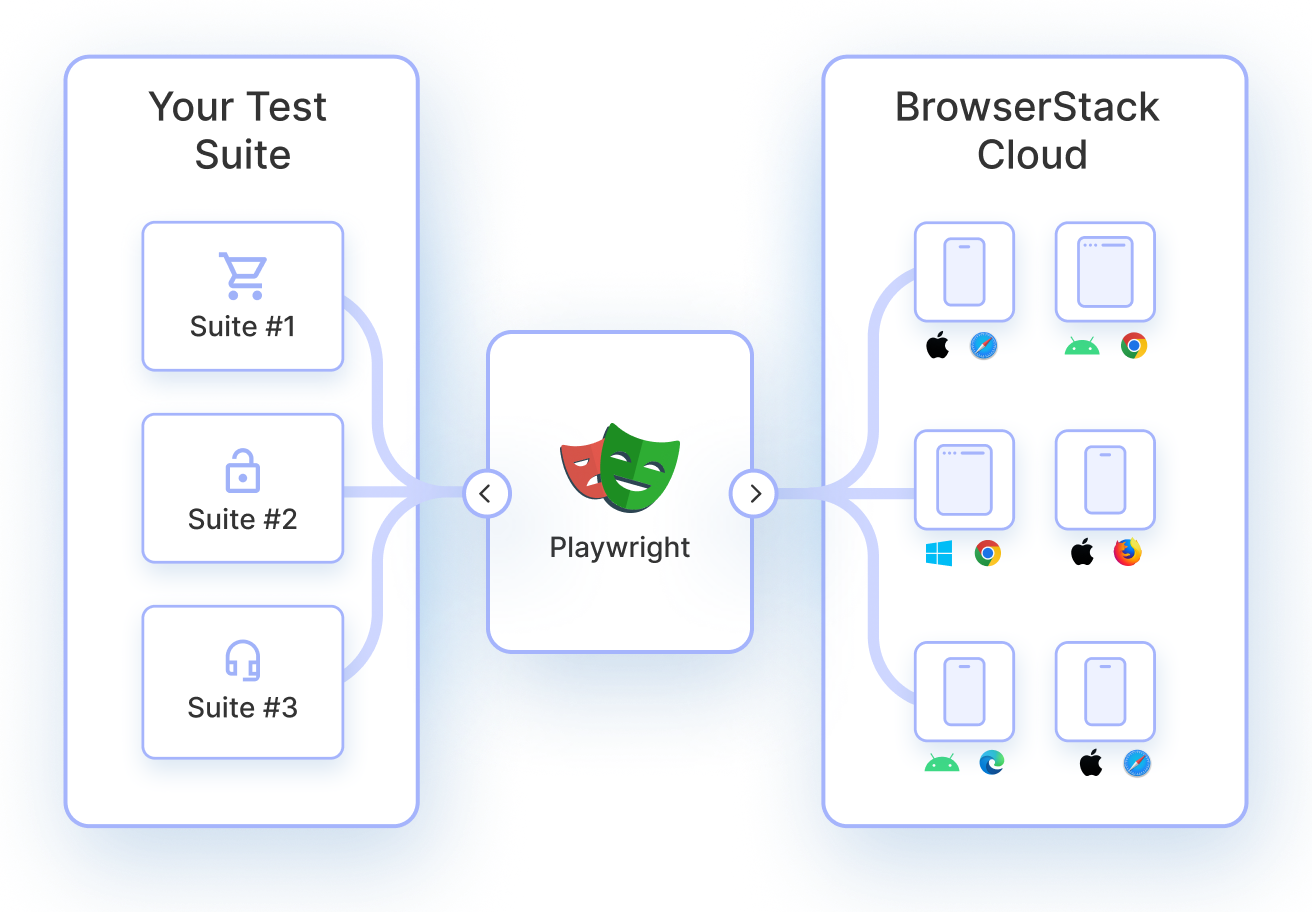
BrowserStack becomes especially relevant when Playwright is used for unit testing because browser realism is the primary reason to adopt Playwright at this level. Local and headless executions validate logic, but they often fail to expose browser-specific behavior that surfaces later in CI or production.
BrowserStack Automate provides a real-browser execution layer that strengthens confidence in Playwright unit tests without adding infrastructure overhead.
At a high level, BrowserStack Automate allows Playwright unit tests to run consistently across real browsers and operating systems, eliminating environment-specific gaps that local setups introduce.
Key reasons to use BrowserStack for Playwright unit tests include:
- Run unit-level Playwright tests on real Chrome, Firefox, Safari, and Edge browsers instead of relying only on headless execution
- Catch browser-specific rendering, timing, and API behavior issues early, before tests move to integration or end-to-end stages
- Scale execution through parallelization, keeping unit test feedback fast as coverage grows
- Remove flakiness caused by local machine differences, OS versions, or browser updates
- Integrate seamlessly with CI pipelines to ensure consistent results across developers and environments
- Avoid maintaining browser grids, drivers, or device infrastructure internally
Conclusion
Playwright works for unit testing when browser behavior is part of the logic being validated. Used selectively and structured carefully, it bridges the gap between fast logic tests and full user flows. The value lies in knowing when browser realism improves confidence and when traditional unit tests remain the better choice.